
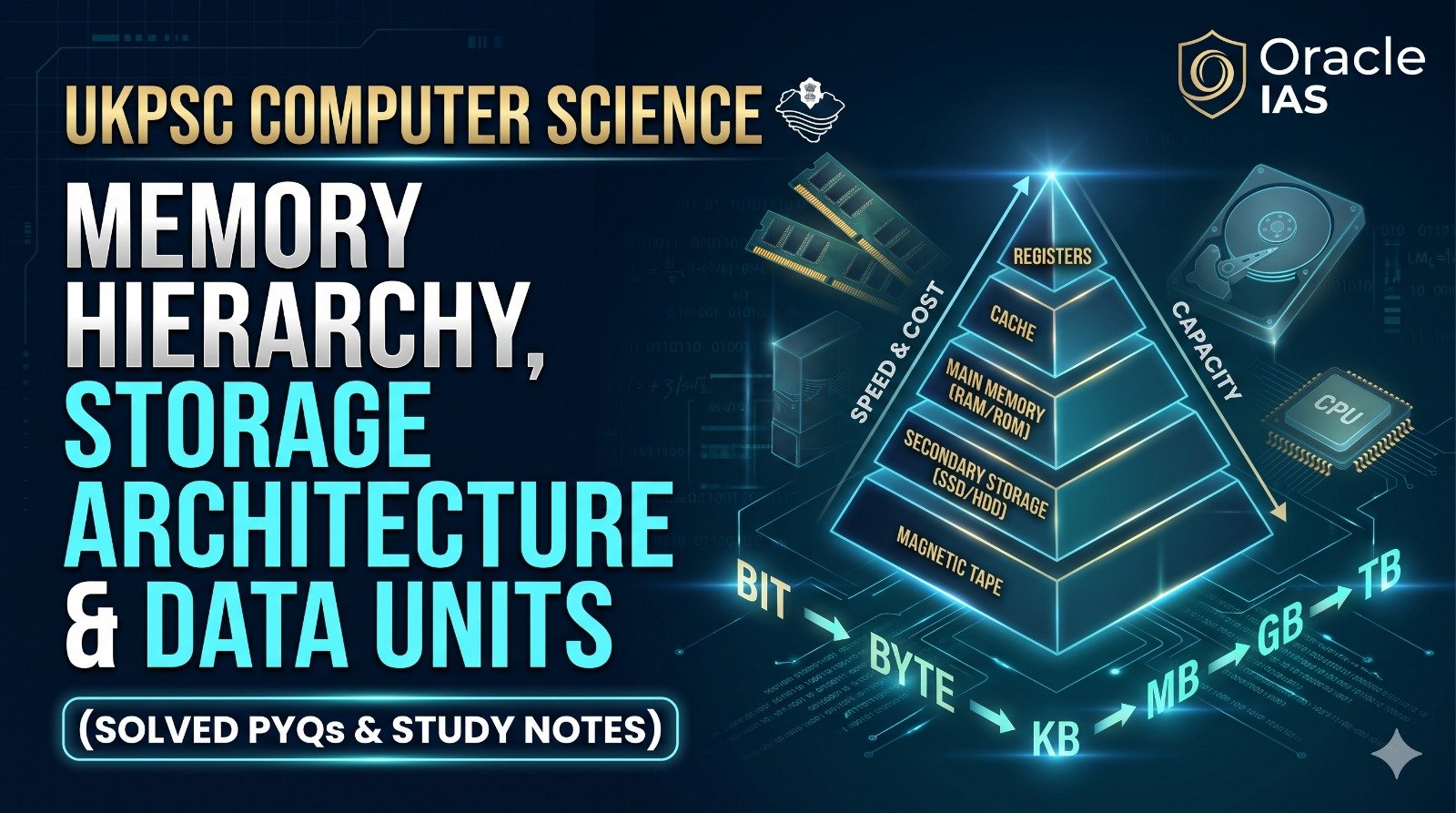
UKPSC Computer Science Unit 3: Memory Hierarchy, Storage Architecture & Data Units
Part of the UKPSC General Science & Technology Revision Series.
1.High-Yield Micro-Notes
- Memory Hierarchy & Access Latency: In computer architecture, storage systems are organized into a hierarchical pyramid that balances access speed, physical cost per bit, and capacity:
- Level 0 (Processor Registers): Built directly into the CPU core; operates synchronously at processor clock speeds (access latency $< 1$ nanosecond); lowest capacity (hundreds of bytes).
- Level 1–3 (Cache Memory): Fabricated with high-speed Static RAM (SRAM) on or near the processor die; functions as an intermediate buffer caching frequently requested data and instructions to prevent processor stalls; has the lowest access latency after internal registers.
- Level 4 (Main Memory / Primary RAM): Fabricated using Dynamic RAM (DRAM); volatile system memory where active programs and operating system routines reside during runtime; requires continuous periodic capacitor refreshing.
- Level 5 (Secondary Mass Storage): Non-volatile magnetic storage (Hard Disk Drives) and solid-state flash drives (SSD, NVMe, USB Pen Drives); higher capacity, lower cost per bit, but significantly slower access speeds (milliseconds to microseconds).
- Level 6 (Tertiary / Auxiliary Optical & Tape Storage): Removable media (CD-ROM, DVD, Magnetic Tape) used for offline archival storage and backup.
- Primary System Memory Types:
- Random Access Memory (RAM): Primary, volatile memory that allows read and write operations; its contents are cleared when power is turned off.
- Read Only Memory (ROM): Primary, non-volatile memory containing permanently flashed system firmware (BIOS / UEFI); its contents persist without power and cannot be modified during normal operation.
- Secondary & Optical Storage Systems:
- Hard Disk Drive (HDD): Non-volatile secondary storage that reads and writes data via magnetic heads flying over rotating magnetic platters.
- Compact Disc Read-Only Memory (CD-ROM): Optical storage medium using microscopic pits and lands stamped onto a polycarbonate disc, read by a focused laser diode. Standard storage capacity is approximately 700 MB.
- Digital Versatile Disc (DVD): Optical disc storage with tighter track pitches and a shorter wavelength red laser (650 nm vs. 780 nm for CD), providing higher data density. A standard single-layer DVD holds 4.7 GB (roughly seven times the capacity of a standard CD-ROM).
- Flash Storage (Pen Drive): Removable secondary storage built with non-volatile floating-gate or charge-trap NAND flash memory cells, interfacing through standard USB controllers.
- Virtual Memory & Address Translation:
- Virtual Memory: A memory management technique that allows the execution of processes that exceed physical RAM capacity by mapping contiguous virtual addresses to non-contiguous physical pages.
- Paging: A scheme that divides a process’s virtual address space into fixed-size blocks called pages and physical memory into matching blocks called page frames, swapped between RAM and secondary disk storage as needed.
- Digital Measurement Units & Hierarchy: The fundamental unit of binary data is the bit (binary digit, 0 or 1). In computer storage, units follow base-2 ($2^{10} = 1024$) increments:
- 1 Nibble = 4 Bits (Half a Byte)
- 1 Byte = 8 Bits
- 1 Kilobyte (KB) = 1024 Bytes ($2^{10}$ Bytes)
- 1 Megabyte (MB) = 1024 Kilobytes ($2^{20}$ Bytes)
- 1 Gigabyte (GB) = 1024 Megabytes ($2^{30}$ Bytes)
- 1 Terabyte (TB) = 1024 Gigabytes ($2^{40}$ Bytes)
2. Important facts you should know:
| Memory Type | Technology | Volatility | Typical Access Time | Primary Role |
| CPU Registers | Flip-flops on CPU die | Volatile | $< 1$ ns | Holds active instruction operands and flags. |
| Cache Memory | Static RAM (SRAM) | Volatile | 1–10 ns | Buffers frequently accessed instructions and data. |
| Primary RAM | Dynamic RAM (DRAM) | Volatile | 10–50 ns | Main operational workspace for OS and programs. |
| ROM (BIOS) | EEPROM / Flash | Non-volatile | 50–100 ns | Stores permanent boot firmware and hardware initialization code. |
| Flash Drive / SSD | NAND Flash | Non-volatile | 50–100 $\mu$s | Fast, solid-state secondary mass storage. |
| Hard Disk (HDD) | Magnetic platters | Non-volatile | 5–15 ms | High-capacity magnetic secondary data storage. |
| CD / DVD | Optical pits and lands | Non-volatile | 100–200 ms | Removable optical media (CD: 700 MB, DVD: 4.7 GB). |
3. Master Questions
Q1. In digital computer memory metrics, one Kilobyte (KB) is exactly equal to:
[UKPSC Pre 2004-05 | UKPSC Mains 2002-03 | UKPSC RO/ARO Pre 2023] [Direct Fact]
(a) 1000 bits
(b) 1024 bytes
(c) 1000 bytes
(d) 1048 bytes
Q2. Which of the following computer memory locations has the lowest access time and is checked first by the CPU when fetching instructions?
[UKPSC RO/ARO Pre 2022 | UKPSC Combined SES 2021 | UKPSC Junior Assistant 2022] [Direct Fact]
(a) Registers (or Cache Memory among options excluding internal registers)
(b) Primary Dynamic RAM
(c) Magnetic Hard Disk
(d) Secondary Optical Disk
Q3. A digital data unit consisting of exactly four (4) bits, or half of a standard byte, is termed a:
[UKPSC Mains 2002-03 | UKPSC FRO/ACF Pre 2021] [Direct Fact]
(a) Byte
(b) Nibble
(c) Word
(d) Register
Q4. What is the full form of ‘RAM’ in computer hardware terminology?
[UKPSC Pre 2002-03] [Direct Fact]
(a) Recent and Ancient Memory
(b) Random Access Memory
(c) Read and Memorize
(d) Recall All Memory
Q5. A small, solid-state secondary storage device that plugs into a USB port to store and transfer files is a:
[UKPSC Pre 2006-07 | UKPSC Mains 2004-05] [Direct Fact]
(a) Magnetic tape unit
(b) Removable flash Pen Drive
(c) Primary DRAM chip
(d) Read-only BIOS PROM
Q6. The Basic Input-Output System (BIOS) firmware that initializes computer hardware during boot is stored in:
[UKPSC Pre 2006-07] [Direct Fact]
(a) Secondary Hard Disk
(b) Volatile Random Access Memory
(c) Non-volatile Read Only Memory (ROM)
(d) Dynamic Cache
Q7. In the digital memory hierarchy, one Gigabyte (1 GB) is equal to:
[UKPSC RO/ARO Pre 2022] [Direct Fact]
(a) 1024 bytes
(b) 1024 Kilobytes (KB)
(c) 1024 Megabytes (MB)
(d) 1000 Megabytes
Q8. Optical disc media designated as ‘DVD’ (Digital Versatile Disc) typically provide a standard single-layer storage capacity of approximately:
[UKPSC AE 2007] [Direct Fact]
(a) 700 Megabytes
(b) 1.44 Megabytes
(c) 4.7 Gigabytes
(d) 25 Gigabytes
Q9. One Terabyte (1 TB) of storage capacity comprises:
[UKPSC Constable 2021] [Direct Fact]
(a) 1024 Gigabytes (GB)
(b) 1024 Megabytes (MB)
(c) 1024 Kilobytes (KB)
(d) 1000 Gigabytes (GB)
Q10. The memory management scheme that divides virtual address space into fixed-size blocks, permitting physical allocation into non-contiguous memory frames, is called:
[UKPSC AE 2013] [Direct Fact]
(a) Paging
(b) Spooling
(c) Direct Memory Addressing
(d) Memory Fragmentation
4. Master Explanations & Answer Key
- Ans. (b)
- Direct Answer: In digital computing, memory capacities follow base-2 ($2^{10}$) increments, meaning 1 Kilobyte (KB) = 1024 bytes.
- Exam Trap / Distractor Alert: While the metric prefix “kilo-” denotes 1,000 in standard SI units, binary computer memory uses powers of two ($2^{10} = 1024$).
- High-Yield Extra Facts: Storage drive manufacturers sometimes use decimal increments (1 KB = 1000 bytes) when labeling retail capacities, which explains why a drive’s reported binary capacity in an operating system appears lower than its advertised packaging size.
- Ans. (a)
- Direct Answer: Registers located inside the CPU have the lowest access latency ($< 1$ ns); among cache, RAM, and disk storage, Cache Memory has the lowest access time and is checked first by the CPU.
- Exam Trap / Distractor Alert: Access speed order (fastest to slowest): CPU Registers > Cache Memory > Primary RAM > Secondary Storage (SSD/HDD) > Optical Disks.
- High-Yield Extra Facts: Modern CPUs use multi-level caching (L1, L2, and L3 caches); L1 is the smallest and fastest (located on each processor core), while L3 is larger, slightly slower, and shared across all cores on the die.
- Ans. (b)
- Direct Answer: A Nibble is a digital data unit consisting of 4 bits, which equals half of an 8-bit byte.
- Exam Trap / Distractor Alert: 1 Byte = 8 bits; 1 Nibble = 4 bits; a single hexadecimal digit ($0\text{–}F$) corresponds to exactly one nibble.
- High-Yield Extra Facts: Two hexadecimal characters can represent one full 8-bit byte (e.g., $FF_{16} = 11111111_2 = 255_{10}$).
- Ans. (b)
- Direct Answer: RAM stands for Random Access Memory, meaning any individual memory address can be read or written to in constant time regardless of its physical location in the array.
- Exam Trap / Distractor Alert: RAM is volatile; its stored data is lost when the computer loses power.
- High-Yield Extra Facts: Dynamic RAM (DRAM) uses a single transistor and capacitor per bit cell, requiring periodic electrical refreshes; Static RAM (SRAM) uses four to six cross-coupled transistors per cell, retaining data without refreshing as long as power is applied.
- Ans. (b)
- Direct Answer: A Pen Drive (USB flash drive) is a portable, solid-state secondary storage device that uses non-volatile NAND flash memory to store and transfer files.
- Exam Trap / Distractor Alert: Pen drives contain no moving mechanical parts or magnetic platters, distinguishing them from traditional magnetic hard disk drives.
- High-Yield Extra Facts: Flash memory retains data without electrical power by trapping electrons inside insulated floating gates or charge-trap silicon nitride layers.
- Ans. (c)
- Direct Answer: The BIOS (Basic Input/Output System) firmware is stored on a non-volatile Read-Only Memory (ROM) or flash EEPROM chip on the motherboard, ensuring it remains intact across system shutdowns.
- Exam Trap / Distractor Alert: RAM is cleared when the computer shuts down; the initial boot code must reside in non-volatile ROM to start the system.
- High-Yield Extra Facts: Modern computers have largely replaced traditional BIOS with UEFI (Unified Extensible Firmware Interface), which supports drives larger than 2 TB, faster boot times, and Secure Boot verification.
- Ans. (c)
- Direct Answer: 1 Gigabyte (GB) = 1024 Megabytes (MB), continuing the binary progression: 1 Byte $\to$ 1024 Bytes (1 KB) $\to$ 1024 KB (1 MB) $\to$ 1024 MB (1 GB).
- Exam Trap / Distractor Alert: 1 GB equals $1024 \times 1024 \times 1024$ bytes ($2^{30} = 1,073,741,824$ bytes).
- High-Yield Extra Facts: The International Electrotechnical Commission (IEC) introduced prefixes to distinguish binary multipliers (Kibibyte / KiB = 1024 bytes, Mebibyte / MiB, Gibibyte / GiB) from decimal SI prefixes (KB = 1000 bytes, MB, GB).
- Ans. (c)
- Direct Answer: A standard single-sided, single-layer Digital Versatile Disc (DVD) holds approximately 4.7 Gigabytes (GB) of data.
- Exam Trap / Distractor Alert: Standard CD-ROMs hold ~700 MB; standard single-layer Blu-ray discs hold 25 GB; single-layer DVDs hold 4.7 GB (and dual-layer DVDs hold ~8.5 GB).
- High-Yield Extra Facts: DVDs achieve higher data density than CDs by using a shorter-wavelength red laser (650 nm vs. 780 nm for CDs) and lenses with higher numerical aperture, allowing smaller pits and tighter track spacing.
- Ans. (a)
- Direct Answer: 1 Terabyte (TB) = 1024 Gigabytes (GB), equivalent to $2^{40}$ bytes ($1,099,511,627,776$ bytes).
- Exam Trap / Distractor Alert: Memory units follow the binary sequence: $1\text{ TB} = 1024\text{ GB}$; $1\text{ Petabyte (PB)} = 1024\text{ TB}$; $1\text{ Exabyte (EB)} = 1024\text{ PB}$.
- High-Yield Extra Facts: Terabyte-scale storage is common in consumer solid-state drives and hard drives used for personal computing and data backup.
- Ans. (a)
- Direct Answer: Paging is a memory management scheme that divides a program’s virtual memory into fixed-size blocks called pages, mapping them to available physical memory frames in RAM to eliminate external fragmentation.
- Exam Trap / Distractor Alert: Spooling (Simultaneous Peripheral Operations On-Line) buffers print jobs on disk; Paging manages virtual memory allocation across physical RAM and secondary swap space.
- High-Yield Extra Facts: The hardware unit inside the CPU responsible for translating virtual page addresses into physical frame addresses is the Memory Management Unit (MMU), using a fast cache called the Translation Lookaside Buffer (TLB).
Contact Oracle IAS:
Call/WhatsApp 9997453844 for details
Join Our Preparation program:

He is a bibliophile,accomplished writer and a fitness enthusiast.
- UKPSC Computer Science: Cybersecurity, Malware, IT Act 2000 & Cloud Computing (Solved PYQs & Notes) - November 28, 2026
- UKPSC Computer Science: Computer Networks, Data Transmission, OSI Model & Internet Protocols (Solved PYQs & Notes) - November 28, 2026
- UKPSC Computer Science: Programming Languages, Compilers & Database Systems (DBMS) (Solved PYQs & Notes) - November 28, 2026
 WhatsApp us